
Review: Corel Ulead PhotoImpact X3 Photo Editing & Enhancing Software
 Corel Ulead PhotoImpact X3
is a strong all-in-one image editing suite packed with
features that give you excellent value for the money. It is
suitable for beginning photographers as well as intermediate/advanced photography
users, although there is a bit more of a learning curve than
with some other photo editing software programs. For under
$100, you get a full spectrum of features and tools to handle
everything from everyday photo editing and enhancing tasks
to advanced features rivaling products that cost much more,
plus basic web page design, web graphics creation, drawing and painting, 3D capabilities,
CD burning and other extras.
Corel Ulead PhotoImpact X3
is a strong all-in-one image editing suite packed with
features that give you excellent value for the money. It is
suitable for beginning photographers as well as intermediate/advanced photography
users, although there is a bit more of a learning curve than
with some other photo editing software programs. For under
$100, you get a full spectrum of features and tools to handle
everything from everyday photo editing and enhancing tasks
to advanced features rivaling products that cost much more,
plus basic web page design, web graphics creation, drawing and painting, 3D capabilities,
CD burning and other extras.
While not extensively upgraded from previous versions, new features in PhotoImpact X3 include rule of thirds crop and golden ratio crop, comic strip and collage creation, resize for email, cloud pen tool, slide show wizard, enhanced wizard for making DVD menus/labels, calendars and greeting cards.
Main Features
 The SmartGuide provides step-by-step directions
to walk you through photo editing tasks, video and DVD menu
creation, web page and other tasks.
The SmartGuide provides step-by-step directions
to walk you through photo editing tasks, video and DVD menu
creation, web page and other tasks.
- From the EasyPalette you can access over 800 predefined
drag-and-drop effects, shapes, styles and textures. They
can be customized and saved as macros for future use.
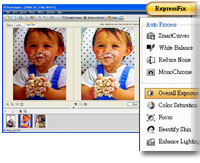
- Powerful editing tools. You can work in ExpressFix Mode and use Auto-process command
for automated photo enhancements to make adjustments to
levels, brightness and contrast with one click that makes
it easy for beginners. There is also a Full Edit feature fore more experienced users.
- Special tools include SmartCurves automatic adjustment
for tonal correction. Under Portrait Touch-Ups whiten teeth, remove blemishes and .
- Auto white balance control with auto presets and detailed
settings to fine-tune adjustments.
- Vector and bit-map drawing, 3D design, web graphics and customizable blog and web page templates.
- Enhanced noise-reduction feature, enhanced RAW file and
16-bit image support.
- Support for extra large files of images taken with digital
cameras 8mp and above.
- Dockable panels to improve and organize your workflow,
along with enhanced split screen previewing so you can preview
your changes.
- Object Extraction Wizard to extract objects from an image
and place them into another image in four steps.
- 70 customizable templates for photo greeting cards and
other creative projects.
- Supports 52 file formats.
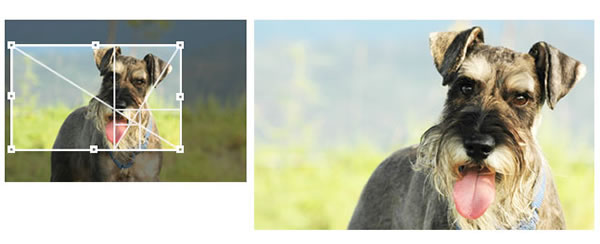 |
| The Golden Ratio Crop creates an esthetically pleasing crop. |
Other Editing Tools
Among the many other features are a Vignette tool, 11 filters to create effects such as motion blur or film grain, 7 Artistic effects such as stippling and engraving, 9 Painting effects such as decoupage and halftone, layer mask, enhanced text tool, enhanced path tool, 12 different Painting Tools such as Crayon and Charcoal, 14 retouching tools such as burn, remove scratch, a Touch-Up Tool, Stamp Tool and Color Picker
Web, DVD and Video Graphics
You can create DVD menu buttons, web and video objects, compress images into web-friendly formats, create web pages or blogs using pre-made templates and javascript effects, and more.
Printing
Print options include Print Multiple, Print Poster, and there are over 200 Preset Layouts.
Bonus Software
PhotoImpact ships with the full version of Corel® Painter™ Essentials 3, a complete home art studio enabling you to draw or paint original artwork, or enhance your photos with paint effects. It also comes with the full version of Corel Media One media management.

 Hi. I'm