Review: Snapfish Photobooks
Prices: $4.99-$44.99+
Book Quality: 
Ease of Use: 
Pricing:
Features:
Customer Service: 
Shipping/Turnaround:
• Acid free 100lb archival
quality 'Mohawk' paper
• Professional design themes
• Multiple page layouts
• Min-max pages: 20-150
• Hardbound cover or leather
or velvet padded cover
• Premium Lay flat books in
8x11 and 11x14
• Smaller books are paper
cover with cloth tape binding
Go to Snapfish.com

In revisiting Snapfish to update my review I was pleased to see they have improved their photo book templates, sizes and covers and offers more layouts and customization.
Like most major online photo printing services, Snapfish allows you to create personalized photo books for your special memories, including special theme books for weddings, babies, travel and more with their user-friendly software. Snapfish is a good choice because they offer outstanding quality with lots of binding options and sizes, although they don't have as many themes and layout options as Shutterfly and Mixbook.
I'm delighted that the service has finally increased its personalization, which was one of the frustrations I used to have with the site when making a photo book. Using the new Freestyler feature, you now have the ability to:
- Resize, move, and angle your photos anywhere on the page
- Add text or photo captions wherever you want
- Overlap photos and text (layers)
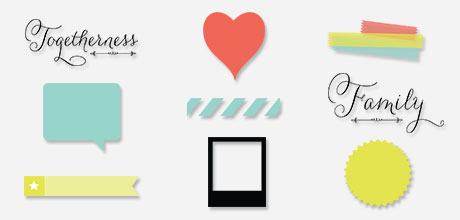
Snapfish is also featuring stickers and embellishments that you can add to your pages. Right now there is no extra charge, but they note on their website that they are free for a limited time. Below is a small sample.
Snapfish is a reliable choice and this review will show you won't be disappointed with the quality. You can make a nice book at a very good price by taking advantage of their many of sales and discounts. For instance, you'll save 25% when you order additional copies of the same book. You can get other current discounts here.
Photo Book Sizes and Cover Options
Hardcover photo books in four sizes:
- 8x8 with custom printed hardcover or basic hardcover with dust jacket
- 8x11 Personalized with custom printed hardcover or custom dust jacket over black linen hardcover, or leather or linen with die-cut window. Custom hardcover with photos and captions printed directly on the cover, spine, and back. With a dust jacket cover, you can add photos and captions to the front and back covers and inside flaps of the dust jacket.
- 12x12 with padded white or black leather or tan, red or blue velvet hardcover with vellum pages between the cover and book pages.
- 11x14 books have lay flat binding so the pages open up and lay flat. They are available in hardcover and hardcover with dust jacket. These books are ideal for wedding and travel books and other special occasions (see below regarding the Premier books).
Soft cover photo books
- 5x7 and 8x8 paperback with sturdy soft cover and personalized cover
- 5x7 die-cut window on sturdy paper cover
- 2x3 mini books with paper cover
- 4x6 and 5x7 Flip Books - spiral bound
- Picture Me® books with durable, laminated paperboard available in 6 different stories featuring your child as the star.
Lay Flat Pages
As mentioned above, Snapfish now offers photo books with lay flat pages. They have two products; one is an upgrade to a standard custom hardcover photo book with hinged pages that stay flat when opened. The second option is an entirely separate product: the aforementioned a Premier lay flat book offered in four sizes with thick, premium paper. Spreads are printed on a continuous sheet so there is no gutter or break down the center. You can read more about Snapfish's lay flat photo books in a post I did that covers major companies offering this book style.
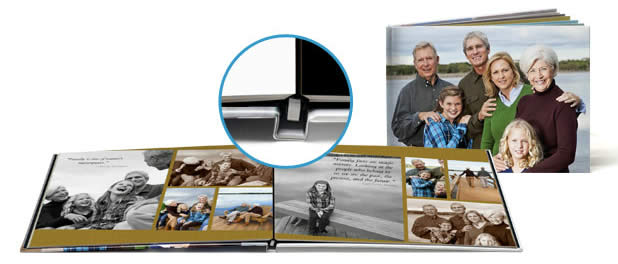 |
| Snapfish now has lay flat photo books in two sizes, 8x11 and 11x14 hard cover. |
Photo Book Prices
| Size | Flip Book | Soft cover | Hard cover | Dust Jacket Over Hard Cover | Padded Velvet Cover | Linen Hard Cover w/die-cut window | Leather Hard Cover2/ die-cut window |
| 2x3 | _ | $5.99 | _ | _ | _ | _ | _ |
| 4x6 | $4.99 | _ | _ | _ | _ | _ | _ |
| 5x7 | $4.99 | $11.99*/$12.99 | _ | _ | _ | _ | _ |
| 8x8 | _ | $19.99 | $28.99 | $28.99 | _ | _ | _ |
| 8x11 | _ | _ | $29.99 | $29.99 | _ | $24.99 | $24.99 |
| 12x12 | _ | _ | $49.99 | _ | $49.99 | _ | $49.99 |
| 11x14 | _ | _ | $59.99 lay flat | $29.99 lay flat | _ | _ | _ |
* Die-cut paper cover
Prices as of Nov 2012, based on a 20-page book. additional pages range from $.50 to $1.50 depending on cover and size. Max 150 pages (lay flat books are 20-90 pages). Shipping is extra.
Photo Book Paper
Photo Books are prints on acid free 100lb 'Mohawk' paper which is Green Seal certified, elemental chlorine free (ECF), ph buffered and lignin free.
Photo Book Styles, Templates, Backgrounds and Layouts
Snapfish offers over 55 photo and text layouts and more than 40 designs and locations. Photo book page templates and background themes include Key West, Family Memories and South Pacific, which I think are very attractive and give more of a scrapbook feel. There are also the typical baby and kids, wedding, travel, seasonal, holidays such as Halloween, Christmas, pets, sports and more, plus vintage, patterns, stripes, dots and solids.
You can print a title and photos directly on the book's cover and print titles on the spine of hard cover books. You may customize your photo book with your own captions, and use different backgrounds for each page if desired. Captions and text may be added in a variety of fonts, sizes and colors. As I mentioned, you now have the ability to move and resize photo and text books and overlap images or text. They have eliminated the option of choosing photo borders, I don't know why. Pictures can be arranged from 1 to up to 15 per page (depending on the photo book size and style selected) including full bleed and you can have a page with text only.
Photo Book Creation
Photo book creation is pretty intuitive. Once you have uploaded your photos or imported them from your Snapfish album into the photo book work space, Snapfish will ask you if you want your photos automatically added to your photo book layout. If you say yes, the software will auto fill photos into a layout it determines to be best, in order of time stamp. You can always change the layout or number of photos on a particular page, or you can choose to lay out each page yourself. You can view small or large thumbnails (I love the new large size, makes it so much easier to see) and hide ones you've used.
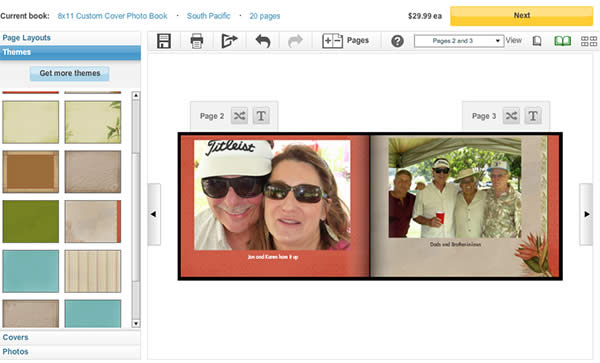 |
| Snapfish has a number of new themes. This one is called South Pacific and has an elegant feel. |
I did find the software a little overly sensitive sometimes when trying to resize a photo box. It kept getting larger and larger! But the text box stayed centered with the growing photo box, which was a big help. You can zoom, rotate, flip, remove red eye, adjust exposure, enhance color and change tint directly from within a photo book page in the editing mode. The software also lets you change themes, add backgrounds from other themes to your current book, and page backgrounds and layouts as you go if you change your mind. If you want to change the background of a particular page, just drag and drop it onto your page or apply that background to all with one click. You can even pick a background from a different theme and apply it to just one page by dragging and dropping.
Sharing
You can share your book via email, send a link or via Facebook.
Snapfish makes it so easy to create customized photo books, and they offer so many great discounts, I don't even bother making regular prints anymore. Photo books are the way to go.
Compare Snapfish with Other Photo Services
I have compiled a review chart comparing Snapfish's features with various other photo book services.
 Go to Snapfish.com
 Hi. I'm