ACDSee Photo Editor: Super Easy With Great Results
I just tried ACDSee's Photo Editor on my vacation photos and I'm very excited about this software program. A lot of people avoid buying editing software because they are intimidated by the learning curve or they just don't have the time. I found ACDSee's Photo Editor to be the easiest photo software I've ever used, and I got great results. In a nutshell, Photo Editor does what other graphic software programs do but it cuts out a lot of steps to make it faster and easier for you.
Features in Photo Editor:
- Faster processing time. The prior version could be a tad slow sometimes.
- More custom creative tools and options for resizing, cropping and masking.
- Fast Web optimization and enhanced printing functions
- 70 effects including Sepia and Gaussian Blur that can be previewed, without modifying the original image. Artistic effects that can be added, modified or deleted at any time.
- "Trim to shape" feature for quick-and-easy use of design templates
- Advanced journaling and text curving capabilities
- New layout templates created by top designers.
- Advanced Text Features: To enhance layout versatility, Photo Editor 2008 offers a variety of options for text integration. Custom text paths allow users to use drawing tools to create paths that can follow elements within the layout.
- Easy to Use: Photo Editor has a "How To" feature that holds your hand through the whole process and gives you clear step-by-step instructions on a variety of tasks such as lightening dark photos, removing color tint, removing blemishes and imperfections as well as unwanted objects like telephone lines.
 One feature I used several times is the Shadows/Highlights feature to correct photos taken in bright light where the person in the photo is shadowed and the background is bright to get the right overall light balance. It was very fast and easy and my photos were much improved.
Photo Editor also covers the simplest of the basics like how to get your photos and opening files and photos. You can choose to use the How-To feature, or if you already know what you are doing, you can proceed on your own without annoying pop-ups telling you what do do.
The software also seamlessly integrates with ACDSee Photo Manager for organizing and managing your photo and digital design collection.
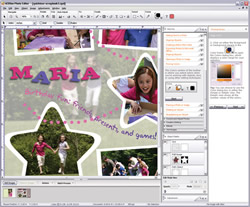 Other features include:
- Vignette Tool: Creates portrait-style photos (i.e. fade the edges of the image) in one simple action - streamlining and facilitating a process for new users that would normally require more advanced techniques.
- Text Support: Simplifies the process of adding text to your creative projects and provides the option to wrap text into thought bubbles or curve your text with one click.
- Batch Process: Allows users to perform certain processes like applying an adjustment/filter, copying objects such as logos, clipart, or images, or creating vignettes to more than one photo at a time with just a couple of clicks.
- Cookie Cutter Tool: Crops your creation into fun shapes like letters, numbers, animals, or shapes, or add distinctive borders to your projects with a simple click.
Photo Editor also shows you creative possibilities, such as what you can do with special effects and filters, and a Variations window shows you up to 8 different previews of your image with the filters or effects you are applying.
Advanced users can create complex projects in Photo Editor's object-based environment using selection tools, gradients, masking techniques, blending modes, and in-depth vector object support.
In addition to working with individual photos, Photo Editor allows you to create scrapbook pages, calendars, cards, postcards, CD covers, invitations, and more. They show you step-by-step how to create fun projects, such as the postcard above.
 |
||
| Tweet | ||
 Hi. I'm Valerie Goettsch. There are so many fun things we can do with our digital photos. Here you'll get personal reviews and photography tips to make your photos shine. Follow me on...