My Publisher Photo Book / Album Printing Service
| My Publisher weekly promo coupon code |
MY PUBLISHER
Book Quality: 
Ease of Use:
Pricing: 
Features: 
Customer Service:
Shipping/Turnaround:
Download FREE My Publisher software
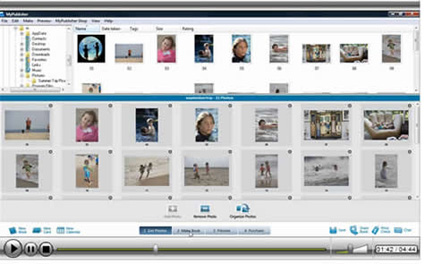
For this review I downloaded the photo book design software (the download and installation process was fast - 11MB) and was pleasantly surprised at how easy it is to use. There are a variety of templates to make the design process fairly fast. Just open the program, locate your photo folder and drag and drop pictures into your chosen template. You build the book page-by-page. There is also a Simple Publish "auto arrange feature where the software will automatically drop in the photos for you in chronological order. Then you can tweak the layout as desired.
New Customization Features
My Publisher added new customization features to their free downloadable software. Now you have:
- Complete control over personalizing your entire layout
- The capability of adding or deleting image and text boxes as you wish
- Ability to move and resize photo and text boxes to fit your photos exactly
- Create your own backgrounds, use photos as backgrounds
- Create Panorama magazine-style layouts with one photo spread on two pages
Using My Publisher
There are approx 200 layouts to choose from, 30 background color choices and 50 fonts. There are 10 themes you can select from, including Just Photos, Bestseller (photos and text), Modern, Story Teller, Wedding, Oh Boy, Oh Girl, Travel, Vintage and Collage. You can bleed a photo to the edges, which is what I like to do, or spread a photo across two pages. You can select the number of photos you want per page (up to 12), however you cannot create custom templates. For many the available templates will be enough, but those looking for custom layouts may be disappointed. You would need to customize in Photoshop or another program first.
You can move photos and add captions anywhere you choose, and you can have an entire page of just text. You can also rotate and resize photos. Once you choose a general theme you have to use it throughout, but you do have a range of templates within that general style. You can set book-wide options for background color or font or have them different on each page.
The software offers basic editing and enhancing such as crop, rotate, auto adjust and red-eye correction For publishing, there is a minimum of 20 pages required and you can print books with up to 100 pages. As you add pages, the software gives you a running cost of your book in your chosen size and cover. Once you've made your book you can preview it and the software will show any errors such as photo resolution or typos.
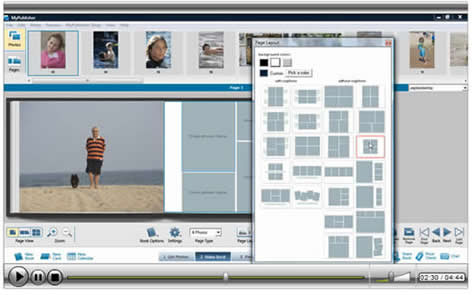
Photo Book Options
Paper
You have a choice of the standard Superior Paper - 120# with a Satin or Matte finish. The Satin is a semi-gloss while the matte has a slight texture and slightly mutes colors for a softer look. There is also a Deluxe Paper weighing a hefty 170# at an upcharge that is also available in Satin or Matte.
Sizes
My Publisher offers 4 book sizes: 3.5" x2.75", 7.75" x 5.75", 11.25" x 8.75" and 15" x 11.5." The11.25" x 8.75" books start at $29.99 for 20 pages + 99 cents/page for additional pages. There are upgrade options for lay flat pages, premium paper and Super Gloss Printing, which really makes images pop with vibrant color. The Deluxe Hardcover is a massive 15 inches x 11.5 inches, regarded as the biggest book available in the custom-publishing market. This would make it ideal for wedding albums.
Lay Flat Pages
My Publisher is one of the few online photobook services that offers lay flat pages. This means that the pages lay flat when opened, there is no curve or curl. This is an extra option available for $15-$45 depending on the book cover style. So you can make an 8.75 x 11.25 Classic hardcover, for example, and choose lay flat pages as an upgrade for an extra $25 per book. The company uses hinged binding with a very small gutter (about 1/16") down the center. I have a detailed post about lay flat photo books with more info on MyPublisher's options. You can read it here.

Photo Book Cover Options
A Linen Cover is standard and you can upgrade to various options: The Photo Finish process ($6-$10 extra) prints your photos directly onto the hardcover and it's laminated to make it scratch and smudge resistant. The removable Book Jacket ($6-$10 extra) allows customized front, back, spine and flaps with photos and text. It is also laminated for protection. Hand-stitched Spanish leather covers are available in black and tan for an extra $20-$30. The linen and leather covers have windows to show the first page photo. There is also a paperback pocketbook cover.
Quality
The printed photo books are beautiful and of very high quality. The printing and book construction is quite good and the binding is sturdy. The Deluxe size features thick 182 lb paper and there are vellum fly sheets at the front and back that add a touch of class. All photobooks are printed using digital 4-color printing process.
Online Sharing
When your book is printed you will receive an email with a link to a virtual book on line. You get your own password protected account where you can track orders, share and re-order books via My Publisher's web portal My Bookshelf.
Should You Use My Publisher for Your Photo Books?
My Publisher is suitable for people who want to keep things simple and not deal with custom templates or be overwhelmed with options. While there isn't the array of background papers of My Memories Suite, or the photo book size options of Shutterfly, or Adoramapix, My Publisher's software has an easy-to-use interface and produces high quality books. There are frequent discounts available that make My Publisher a very good value.
Other advantages: My Publisher offers fast production and delivery, usually 2-4 business day production time, and a 100% customer satisfaction guarantee. The have great customer service with 24/7 email support and phone support from 9am to midnight EST as well as online FAQ and Forum.

 Hi. I'm