
Creating a Digital Scrapbook Layout Can Be as Easy as Drag and Drop
Creating a digital scrapbook page layout is fun and easy plus digital scrapbooking is a lot cheaper, less messy and takes up a lot less space than traditional scrapbooking methods.
Digital Scrapbooking Software
 Dedicated scrapbooking software programs like My Memories Suite give you loads of free scrapbook templates, background papers, embellishments, word art, etc. My Memories Suite is my go-to software for creating beautiful scrapbooks because everything I need is already there in one package for me to work with, plus I can download additional scrapbooking theme kits from their web site.
While using a scrapbooking kit is a no-brainer because you basically just have to drop in your photos, it's also simple to create your own layouts.
Other Scrapbooking Options
Snapfish offers Unique
Scrapbooking Products.
They're a great resource for photo borders, with over 100
photo borders to choose from, elegant to fun. You also get
free online storage so you can share your scrapbook pages
with friends and family.
Smilebooks
Digital Scrapbooking Articles
Digital
Scrapbooking
Scrapbooking Software
Creating
a Digital Scrapbook Layout
Digital Scrapbooking Templates
Digital Scrapbook Graphics
SmileBooks offers a design service whereby you just have to upload your photos and their design team will create a unique digital scrapbook of your photos for only about $1.00 per page (in addition to the printing cost). I used their service to create a scrapbook of my trip to the Greek Isles and it came out beautifully.
Mixbook
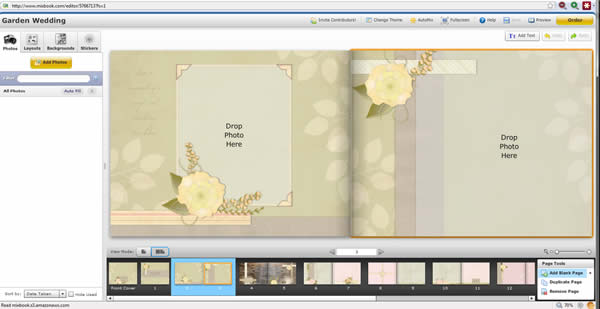
Now, if you want to take the super easy, no-learning curve way, check out Mixbook. This is an online photo book service. They have the most flexible software and there are a myriad of scrapbooking-style backgrounds, embellishments, colors, themes, etc. You can truly make a beautiful scrapbook with them online. It has a powerful editor and there is no software to download, you do it all online.
 Hi. I'm