
Review: Scan Digital Photo, 35mm Slide & Negative Scanning Service
Preserve Memories: Scan and Digitize Your Old Photos, 35mm Slides and Negatives to DVD
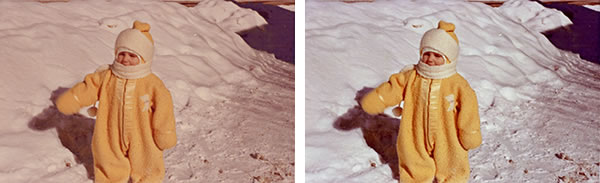
If you are like most people (including myself), you have old photo albums and perhaps a box or two stashed in your closet with hundreds if not thousands of old photographs, just gathering dust, and with the colors fading away. They haven't been looked at for years because you never got around to putting them in albums and probably never will, because by now it's just too overwhelming. And wouldn't it be nice to have those boxes of slides digitized or converted to prints? But how? Scan your old photos, negatives and 35mm slides and give them new life. It's not as hard to do as you may think.
Photos, Negatives and Slides Can Fade and Change Color
Pictures inevitably degrade over time — the colors fade and they can develop a yellow haze. Experts say color photos begin to degrade in just 12 years. The best remedy is to scan your images to digital and preserve your memories before it’s too late.
You can store your newly scanned and digitized pictures on your computer and archive them on DVD, then share them, create digital scrapbooks and more. The problem is, scanning a huge stack of photos and carousels of 35mm slides can be a daunting task. You need to get each image properly aligned in the scanner, make sure the photo and the scanner bed are free of dust, smudges and specks, scan your photo, and then most likely correct the color and clean up scratches. Then repeat 100 or 1000+ times! I've done this; now just the thought of it is enough to make me say forget it; let them continue gathering dust. That's where a professional photo scanning service comes in.
A Professional Scanning Service Can Save Time and Money— and Your Photos
A high quality photo scanning service will scan your photos, 35mm slides and negatives, then correct them for damage such as scratches, fading, and color-shift (i.e. correct that pink, yellow or blue haze that sometimes develops over time on prints). Then they'll put them on their server where you can view or share them. You'll get your originals back along with the scanned images on DVD, CD or even on a hard drive.
While there are numerous scanning services available, there is one that I particularly like and that has received numerous positive reviews:
- ScanDigital, featured in Real Simple, Popular Photography and Redbook.
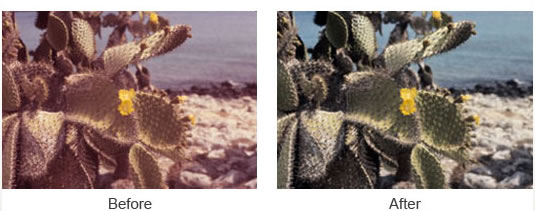
Photos can discolor or color shift over time (see first photo above). Luckily, they can be color-corrected (see 2nd photo) during the scanning process.
Organize Your Pictures, Slides and Negatives for Scanning
Collect all your prints, slides and negatives. Don't forget the ones in albums. I was looking for some college photos that I wanted to scan and upload to my FaceBook page, but found they had faded and discolored terribly. Perfect candidates for a professional scanning company. ScanDigital will even accept whole albums as well as scrapbook pages, large format prints and APS film. If you have hundreds of slides you want to convert, in most cases you can even leave slide carousels intact, for a small fee. The scanning service will remove the slides, scan them and replace them.
Packing Your Items for Scanning
The comapny recommends that you put your negatives and their envelopes into plastic sleeves or ziploc bags and clearly label each sheet or bag with your name and subject matter. Slides can be rubber banded together or kept in slide boxes. Pack your pictures and slides carefully. A sturdy shipping box is strongly recommended. A padded envelope is not enough protection.
Ordering Your Scans
Typically you fill out an online order form, which explains the process including shipping, how you want to receive your photos (i.e. DVD, hard drive). You'' be asked to estimate your order quantity; you don't have to be exact. You may be asked for a partial upfront payment; the amount may depend on the size of your order. Once your images are scanned, you will be able to review them onlines. ScanDigital offers a discounted prepay plan for 1000 images or more.
As part of the order process you can print a shipping label on your computer and drop your box at a UPS pickup location. You'll have a tracking number for your package which provides a safe, easy way to ship and track your package without fear of it getting lost. You will receive emails advising that your items have been received. There is an online tracking system so you know the status of your order from the time it leaves your hands to receipt at their facility to scanning status to return shipment.
Scanning Process
ScanDigital uses Epson 4490 and 4990 scanners for prints and the Nikon Super Coolscan 5000 ED for slides and negatives. They scan 35 mm and APS negatives, 35 mm slides, and printed paper photos up to 8.5" by 11". Photos can be scanned at 300 dpi or 600 dpi (higher cost). All images are cropped, rotated and color corrected and red-eye is removed. Dust and smudges and minor blemishes will be removed. Photos will be organized online according to whatever labels your provided when you sent your photos. You can view images on line, organize and share them. ScanDigital will provide TIFF files instead of JPEG files at no additional charge. If you want both TIFF and JPEG, there is an additional charge of $.20 per image. The TIFF files are left raw, unedited, while the JPEG files are edited by their editing team.
Completing the Scanning Order
Once you have reviewed your images the service will burn a DVD or CD with your scans and send it along with your original images. The option of getting your photos on a hard drive is also available. Again, there will be a package tracking number provided. The digital images will be high-resolution for prints or enlargements. Your scans can also be viewed by family and friends online.
How Long Does It Take
ScanDigital takes an average of 30 days turnaround from the time your items are received until they are ready for viewing online. All images are scanned in Los Angeles County, CA. All material stays inhouse and they have a bar-coded tracking system that enables you to track your material at every stage.
Bottom line: If you have just a handful of photos you want to scan, it may make sense to do it yourself at home if you have a scanner or an all-in-one-printer/scanner. But if you have loads of originals, a scanning service such as ScanDigital makes the most sense in terms of time and headaches.
Related Articles
ScanDigital Film & Video Scanning Review
iMemories Video to DVD Review
Photo, Negative & Slide Scanning Services
35mm Slide Scanning
Photo Restoration Services
 Hi. I'm